
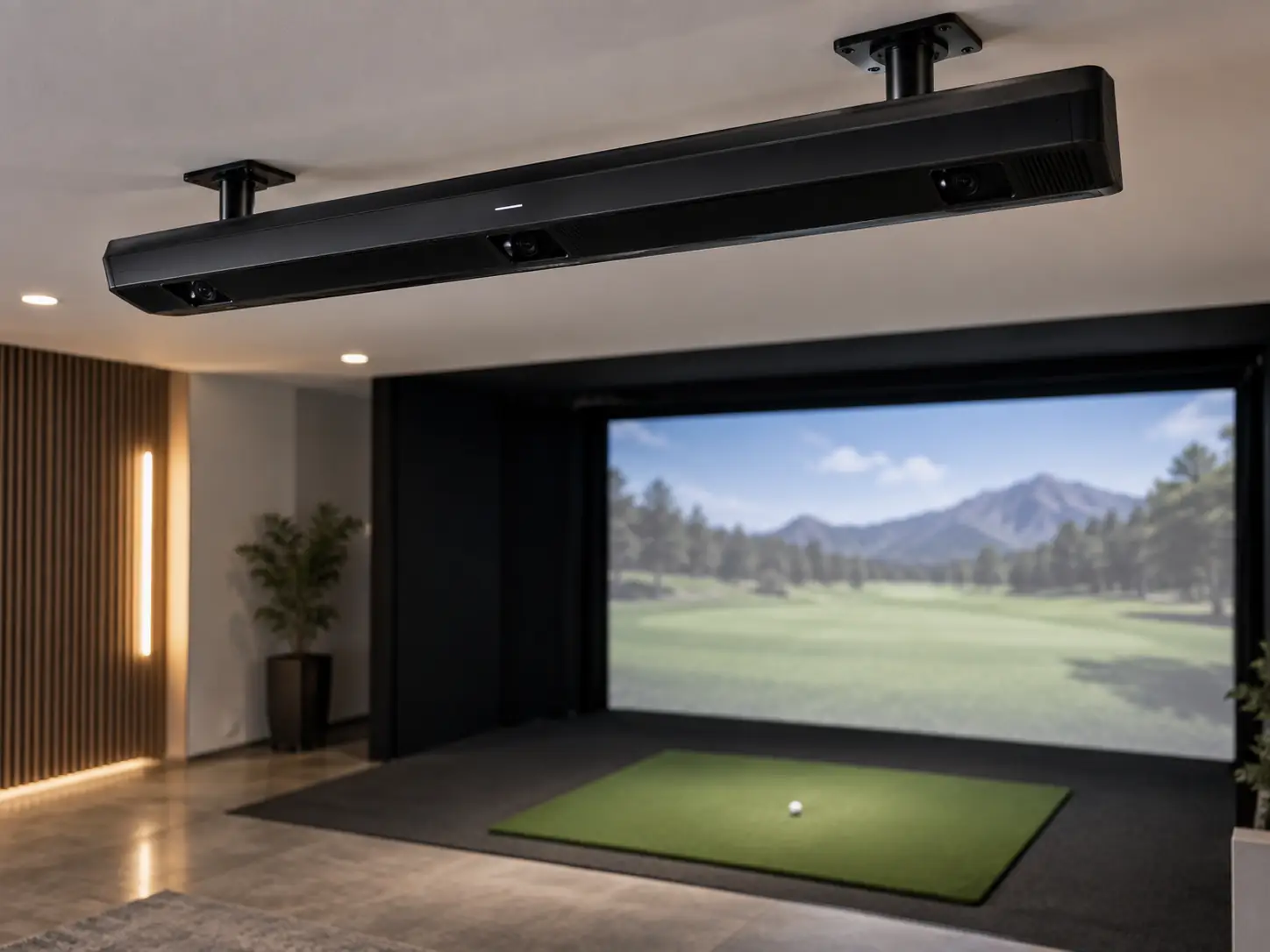
The Uneekor EYE XR is a strong choice for a permanent simulator when clean floor space and sticker-free club tracking matter more than the deepest club-data package.
It mounts behind the golfer, works for either handedness without moving, and keeps the area beside the ball completely open.
At the current $5,999 price, it sits only $500 below EYE XO.
That makes the real decision about workflow, not price alone.
Choose the Uneekor EYE XR launch monitor for the cleaner everyday setup.
Choose EYE XO when its additional club-delivery fields will actually be used.
EYE XR Solves Floor Clutter Before Data Depth
The best thing about EYE XR is what it removes from the hitting area.
There is no launch monitor beside the ball, no unit to move for a left-handed golfer, and no reflective sticker to apply to every club.
Two high-speed cameras watch the shot from the ceiling behind the hitting position.
Uneekor’s Dimple Optix system reads an ordinary white golf ball, while its Club AI system tracks the club without a sticker.
That combination is well suited to a family simulator or teaching bay where different golfers want to walk in and start hitting.
The tradeoff is permanence.
EYE XR needs a fixed indoor ceiling position, a Windows PC, a wired network connection, installation, and calibration.
It is not a monitor you can carry to the range or move into another room for the weekend.
Once installed properly, that lack of portability becomes part of the appeal.
The sensor stays out of the way and the hitting station remains ready.
Rear Mounting Changes The Room Plan
The EYE XR mounts about three feet six inches behind the center of the hitting zone.
Mount the underside of EYE XR within a nine-to-ten-foot height band above the mat.
If the ceiling is higher, you will need a drop mount that puts the cameras back inside that range.
The documented hitting area is approximately fourteen inches long by twelve inches wide.
Rear placement is useful because it keeps the launch monitor away from the flight of a high, badly struck ball.
It can also leave the front ceiling area more open for the projector.
You still need to plan the complete room.
Uneekor currently recommends roughly thirteen feet of width, sixteen feet of depth, and ten feet of height as a general starting point.
The actual safe size depends on the golfer, driver length, screen distance, enclosure, projector, and anything mounted on the ceiling.
The sensor also needs a clear view of the ball.
A projector, ceiling beam, light, or cable hanging through that sightline can create missed shots even when the room dimensions look correct.
Sticker-Free Tracking Has A Four-Metric Boundary
The EYE XR reports nineteen ball, flight, and club values.
Fifteen describe the ball and modeled flight, including speed, launch, spin, carry, run, total distance, peak height, descent, and lateral result.
The current manual lists club speed, smash factor, club path, and face angle as the four club fields.
It also explains that face angle is calculated with Uneekor’s formula rather than directly captured from a reflective clubface sticker.
Uneekor’s broader product comparison currently shows more club fields than the model-specific manual.
Until the manufacturer resolves that conflict, I would buy EYE XR for the four fields clearly documented in its guide.
That is still enough for a lot of home practice.
You can work on speed, strike, start direction, path, and ball flight without preparing every club.
A coach or fitter who needs attack angle, dynamic loft, delivered lie, face-to-path, and numerical impact location should not assume those values are included.
That is where EYE XO becomes easier to justify.
Impact Imagery Explains More Than A Raw Number
Club Optix adds a visual record of the club and ball around impact.
That image can explain why two swings with similar path numbers produced very different shots.
You may see a heel strike, toe strike, thin contact, or a very different relationship between the club and ball.
It turns a strange number into something you can check before the next swing.
The picture is still evidence, not an automatic lesson.
Lighting, club finish, ball position, and the golfer’s interpretation all matter.
Uneekor does not publish a universal error tolerance for every EYE XR metric.
A 2026 Golf Monthly session found the system easy to use and the data credible, but it did not publish paired raw results against a laboratory reference.
I think the right conclusion is that the feedback looks useful and practical.
It is not enough evidence to promise that every field will always fall within a fixed margin.
Installation Quality Becomes Part Of Accuracy
An overhead camera can only measure the scene it has been installed to see.
Height, rear offset, angle, orientation, target-line alignment, turf level, and calibration all matter.
EYE XR uses Power over Ethernet, so one long CAT6 run carries data and power through the supplied adapter.
The final computer connection should go directly to the PC’s onboard Ethernet port.
I would install it in this order:
- Confirm ceiling structure, sensor height, golfer clearance, and the exact center of the hitting zone.
- Mount the bracket in the orientation required for the actual hardware revision.
- Connect the supplied PoE and network components directly to the computer.
- Install Uneekor Launcher, activate the unit, and complete calibration.
- Test ball and club capture before concealing the cables.
Uneekor has documented different cable orientations for different EYE XR revisions.
Use the instructions for your hardware rather than copying a photograph from another simulator.
If no-reads appear, check the geometry, line of sight, network port, software state, and calibration before blaming the cameras.
The Computer And Software Remain Part Of The Purchase
EYE XR depends on a Windows PC for every session.
There is no battery, built-in display, or native tablet fallback.
The computer requirement changes with the experience you want.
Basic VIEW practice is lighter than 4K course play, multiple swing cameras, or AI Trainer.
I would specify the computer for the most demanding program you expect to use regularly.
Player costs nothing and supplies the basic data screen, virtual range, one golfer profile, and a small report allowance.
Pro is the first paid step at $199 annually.
It enables external-simulator connection while increasing profiles, saved reports, and Refine course access.
GSPro, E6 Connect, TGC 2019, Creative Golf, and ProTee Play are sold separately.
Your complete budget may also need the PC, projector, screen, enclosure, hitting mat, mount, cables, protection, and installation help.
A temporary software bundle can lower the first-year total.
Judge the purchase using the normal renewal cost you expect to pay in year two.
Score The XR On Clearance Continuity And Coaching
I would score the EYE XR on three things.
Clearance means the room supports the rear offset, sensor height, full driver swing, screen distance, projector, and enclosure.
Continuity means right- and left-handed golfers can share one calibrated zone without moving hardware or preparing clubs.
Coaching means the four documented club fields and impact image answer the questions you actually work on.
The monitor needs to pass all three.
It can fit the budget and still fail the room.
It can fit the room and still omit a delivery number your coach needs.
It can provide enough data but require software that pushes the complete build beyond the budget.
This simple score keeps the clean overhead design from hiding a mismatch elsewhere in the simulator.
EYE XO Is The Closest And Most Revealing Alternative
EYE XO is the most important alternative because it currently costs only $500 more.
It mounts in front of the golfer and uses club stickers.
In return, its model-specific documentation supports a deeper nine-field club package.
I would choose XR when sticker-free play and a rear-mounted sensor will improve every session.
I would spend the extra money on XO when attack angle, dynamic loft, delivered lie, face-to-path, and impact location have a defined use.
EYE XO2 is a much larger step in price.
Its wider hitting zone and Trouble Mat support make more sense in a busy family, coaching, league, or commercial bay.
The Uneekor golf simulator collection also includes floor models when an overhead installation does not fit the room.
EYE XR Is A Convenience-First Overhead Monitor
EYE XR is built for a simulator that should feel clean and ready every time you walk into it.
It keeps the floor open, handles either handedness, uses ordinary balls, removes club stickers, and provides immediate impact feedback.
That is a valuable combination for repeated home use.
It is not the Uneekor I would choose when detailed club delivery is the entire reason for buying an overhead monitor.
Start with a ceiling mark and a list of the four club values you need.
When both fit, price the computer and software around a permanent simulator that should stay out of the golfer’s way.
What did you think?
Tap a reaction — no need to write anything.
Thanks for letting us know!
Interested in this?
Leave your details and tell us which applies.

Comments are closed.