
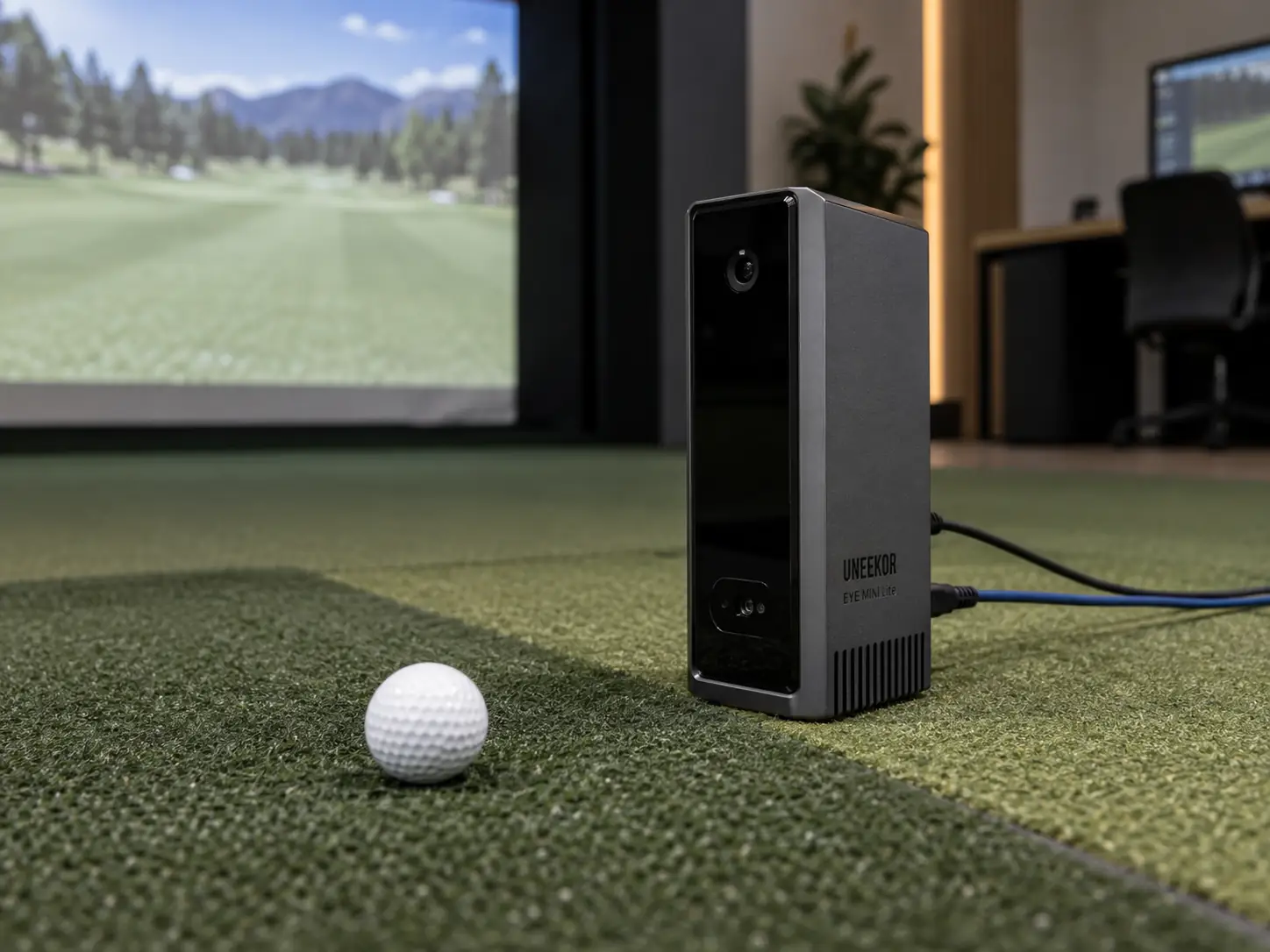
The Uneekor EYE MINI Lite is a very good value when it will stay beside one indoor hitting mat.
It keeps the dual-camera tracking, impact video, nineteen software data points, and twelve-by-eight-inch hitting zone of the portable EYE MINI.
What it removes is just as important.
There is no battery, Wi-Fi, built-in display, iPad mode, or outdoor workflow.
At the current $1,999 price, the Uneekor EYE MINI Lite launch monitor costs $1,000 less than EYE MINI.
I think that is the better purchase when the power and Ethernet cables will never need to move.
A Permanent Bay Makes The Lite Design Logical
EYE MINI Lite is a fixed part of the simulator, not a portable monitor with a few random features missing.
It needs wall power, a direct Ethernet connection, a Windows computer, and Uneekor software for every session.
You cannot carry it to the range and read numbers from the unit itself.
That sounds limiting, but it matches the way many home simulators already work.
A permanent bay usually has a gaming PC, outlets, a hitting mat that stays put, and cable routes that can be hidden or protected.
In that room, paying more for a screen, battery, case, and wireless connection may not improve the experience.
The Lite also sits beside the ball, so there is no ceiling installation.
That can be helpful in a rental, a finished room where you do not want to open the ceiling, or a space with an awkward overhead structure.
The camera system needs very little measured ball flight.
The golfer and impact screen still need enough room to work safely.
Measurement Is Not The Feature Uneekor Cut
The lower price does not come from a documented reduction in the core measurement set.
EYE MINI Lite uses two high-speed infrared cameras and reports nineteen ball, flight, and club values in the software.
The official hitting area is twelve inches wide by eight inches long.
Ordinary white golf balls work without printed markings.
The four club values documented on the current product page are club speed, smash factor, club path, and attack angle.
Those club readings require reflective stickers.
Uneekor’s larger comparison table currently shows additional fields for this model, but that conflicts with its model-specific copy.
I would make the buying decision around the confirmed four rather than expecting face angle, dynamic loft, lie angle, or numerical impact location.
The ball and flight side covers the useful basics for gapping, launch, spin, carry, dispersion, and shot shape.
Carry, run, and other downrange values still rely on a flight model because the real ball stops at the screen.
A hands-on reviewer compared the Lite with an EYE XO during a month of use and reported broadly similar practical readings.
That is encouraging, but it is not a controlled laboratory accuracy study or a promise that every metric will agree.
The Cables Define The Ownership Experience
The wired setup is the main reason this monitor is both affordable and occasionally frustrating.
Power runs to the unit, and a CAT6 Ethernet cable runs directly to the simulator PC.
I would set it up in a simple order:
- Put the unit level with the hitting mat and parallel to the target line.
- Connect wall power and Ethernet directly to the computer.
- Create the Uneekor account and install Launcher.
- Activate the unit, calibrate it, and take several test shots.
- Confirm stable ball and club capture before hiding the cables.
This keeps launch-monitor troubleshooting separate from projector, simulator software, and room-network problems.
Uneekor currently recommends using the PC’s onboard Ethernet port for the monitor rather than placing the device connection through a USB hub.
That can create a small planning issue if the computer has only one network port.
You may need Wi-Fi or a second network adapter for internet access while the onboard port stays dedicated to EYE MINI Lite.
The cables also need physical protection.
A loose Ethernet lead beside a hitting mat is an easy thing to catch with a shoe, vacuum, or movable chair.
The Computer Belongs In The Launch-Monitor Budget
The gaming PC is part of the EYE MINI Lite every time you use it.
There is no iPad or built-in display to fall back on when Windows is updating or the computer is having a bad day.
Current Uneekor recommendations are much more demanding than the older minimum specifications still shown on some retailer pages.
The actual computer you need depends on the software, projector resolution, number of swing cameras, and whether you plan to use AI Trainer.
A basic VIEW practice screen does not need the same graphics power as detailed course play at 4K.
Price the PC for the hardest software you genuinely expect to run.
Then give it proper ventilation and a location that makes Ethernet, projector, and monitor cables easy to service.
I would spend money on a stable computer and safe cable plan before adding decorative lighting or other room upgrades.
A beautiful simulator becomes irritating very quickly when the software stutters or the launch monitor disappears from the network.
Club Optix Makes Stickers Worth Considering
Club Optix impact video gives EYE MINI Lite more teaching value than a simple ball-data monitor.
It shows the club and ball through contact, so you can connect a change in launch or spin with the strike that produced it.
That visual check is especially useful when the numbers alone could point to several different swing problems.
The feature depends on club preparation.
The correct reflective sticker must be visible to the cameras and stay in good condition.
For one golfer with a stable set of clubs, that is a small maintenance job.
For a fitting room using many heads, it becomes part of every session.
EYE MINI Core is worth considering if you only want ball data.
It uses the same fixed style of hardware but sells the club-data and impact-video capability as a separate add-on.
Lite makes more sense when you know those club features matter from the start.
Mixed-Handed Play Exposes The Floor-Unit Compromise
EYE MINI Lite can measure right- or left-handed golfers, but changing between them is not elegant.
Changing handedness means carrying the monitor across the hitting strip.
The power cable, Ethernet cable, software setting, and alignment move with it.
That is more work than repositioning the battery-powered EYE MINI and far more work than using an overhead monitor.
One right-handed golfer in a private bay may never notice the problem.
A family or coaching room with golfers alternating sides can run into it every few minutes.
Before buying, place a box the size of the monitor on both sides of the mat.
Then plan the cable reach and walking paths for each position.
If the room looks cluttered or the cords cross a doorway, the low hardware price may create too much daily friction.
Software Can Turn A Value Purchase Into An Annual Commitment
The no-cost Player level supplies the essential readings, a basic range, one golfer account, and a small set of saved reports.
That may be enough for a golfer who mainly wants structured practice.
The current Pro membership costs $199 per year.
For that fee, Pro opens the outside-software connection and expands profile, report, and Refine allowances.
The supported outside choices currently include GSPro, E6 Connect, TGC 2019, Creative Golf, and ProTee Play.
Each outside program is sold separately.
A GSPro setup therefore needs the Uneekor membership, the GSPro license, and a Windows gaming PC capable of running the course graphics.
Higher Uneekor plans add more courses, profiles, and training features.
I would not choose a more expensive tier until you can name the feature you will use every week.
Temporary software promotions can change the first-year total, so confirm the exact entitlement shown at checkout.
Use The Permanent-Bay Checklist
The Lite decision is mostly a room and workflow decision.
Before buying, confirm these six conditions:
- the monitor will remain indoors beside one mat
- a compatible Windows PC will be available for every session
- power and Ethernet can reach the unit without creating a trip hazard
- the confirmed club metrics and impact video cover your practice needs
- left- and right-handed golfers will not switch constantly
- the membership and simulator software fit the annual budget
One failed item may be manageable.
Several failed items usually point toward EYE MINI, an overhead Uneekor, or another software ecosystem.
The wider Uneekor golf simulator range makes those alternatives easier to compare.
The Value Is Strongest When The Wires Never Move
EYE MINI Lite is a strong indoor launch monitor because the missing features are features a permanent bay may not need.
It still gives you camera-based ball tracking, useful club data, impact replay, a forgiving hitting area, and broad simulator compatibility.
I would choose it over EYE MINI when the monitor, computer, and mat will stay in the same positions for years.
I would pay more for EYE MINI when the built-in screen, battery, iPad support, or outdoor practice will become part of a real routine.
For mixed-handed play, I would seriously consider moving the sensor overhead instead.
The Lite is at its best when you install it once, protect the cables, and stop thinking about the hardware.
Uneekor EYE MINI Lite Review For A Fixed Indoor Setup
The Uneekor EYE MINI Lite is a very good value when it will stay beside one indoor hitting mat.
It keeps the dual-camera tracking, impact video, nineteen software data points, and twelve-by-eight-inch hitting zone of the portable EYE MINI.
What it removes is just as important.
There is no battery, Wi-Fi, built-in display, iPad mode, or outdoor workflow.
At the current $1,999 price, the Uneekor EYE MINI Lite launch monitor costs $1,000 less than EYE MINI.
I think that is the better purchase when the power and Ethernet cables will never need to move.
A Permanent Bay Makes The Lite Design Logical
EYE MINI Lite is a fixed part of the simulator, not a portable monitor with a few random features missing.
It needs wall power, a direct Ethernet connection, a Windows computer, and Uneekor software for every session.
You cannot carry it to the range and read numbers from the unit itself.
That sounds limiting, but it matches the way many home simulators already work.
A permanent bay usually has a gaming PC, outlets, a hitting mat that stays put, and cable routes that can be hidden or protected.
In that room, paying more for a screen, battery, case, and wireless connection may not improve the experience.
The Lite also sits beside the ball, so there is no ceiling installation.
That can be helpful in a rental, a finished room where you do not want to open the ceiling, or a space with an awkward overhead structure.
The camera system needs very little measured ball flight.
The golfer and impact screen still need enough room to work safely.
Measurement Is Not The Feature Uneekor Cut
The lower price does not come from a documented reduction in the core measurement set.
EYE MINI Lite uses two high-speed infrared cameras and reports nineteen ball, flight, and club values in the software.
The official hitting area is twelve inches wide by eight inches long.
Ordinary white golf balls work without printed markings.
The four club values documented on the current product page are club speed, smash factor, club path, and attack angle.
Those club readings require reflective stickers.
Uneekor’s larger comparison table currently shows additional fields for this model, but that conflicts with its model-specific copy.
I would make the buying decision around the confirmed four rather than expecting face angle, dynamic loft, lie angle, or numerical impact location.
The ball and flight side covers the useful basics for gapping, launch, spin, carry, dispersion, and shot shape.
Carry, run, and other downrange values still rely on a flight model because the real ball stops at the screen.
A hands-on reviewer compared the Lite with an EYE XO during a month of use and reported broadly similar practical readings.
That is encouraging, but it is not a controlled laboratory accuracy study or a promise that every metric will agree.
The Cables Define The Ownership Experience
The wired setup is the main reason this monitor is both affordable and occasionally frustrating.
Power runs to the unit, and a CAT6 Ethernet cable runs directly to the simulator PC.
I would set it up in a simple order:
- Put the unit level with the hitting mat and parallel to the target line.
- Connect wall power and Ethernet directly to the computer.
- Create the Uneekor account and install Launcher.
- Activate the unit, calibrate it, and take several test shots.
- Confirm stable ball and club capture before hiding the cables.
This keeps launch-monitor troubleshooting separate from projector, simulator software, and room-network problems.
Uneekor currently recommends using the PC’s onboard Ethernet port for the monitor rather than placing the device connection through a USB hub.
That can create a small planning issue if the computer has only one network port.
You may need Wi-Fi or a second network adapter for internet access while the onboard port stays dedicated to EYE MINI Lite.
The cables also need physical protection.
A loose Ethernet lead beside a hitting mat is an easy thing to catch with a shoe, vacuum, or movable chair.
The Computer Belongs In The Launch-Monitor Budget
The gaming PC is part of the EYE MINI Lite every time you use it.
There is no iPad or built-in display to fall back on when Windows is updating or the computer is having a bad day.
Current Uneekor recommendations are much more demanding than the older minimum specifications still shown on some retailer pages.
The actual computer you need depends on the software, projector resolution, number of swing cameras, and whether you plan to use AI Trainer.
A basic VIEW practice screen does not need the same graphics power as detailed course play at 4K.
Price the PC for the hardest software you genuinely expect to run.
Then give it proper ventilation and a location that makes Ethernet, projector, and monitor cables easy to service.
I would spend money on a stable computer and safe cable plan before adding decorative lighting or other room upgrades.
A beautiful simulator becomes irritating very quickly when the software stutters or the launch monitor disappears from the network.
Club Optix Makes Stickers Worth Considering
Club Optix impact video gives EYE MINI Lite more teaching value than a simple ball-data monitor.
It shows the club and ball through contact, so you can connect a change in launch or spin with the strike that produced it.
That visual check is especially useful when the numbers alone could point to several different swing problems.
The feature depends on club preparation.
The correct reflective sticker must be visible to the cameras and stay in good condition.
For one golfer with a stable set of clubs, that is a small maintenance job.
For a fitting room using many heads, it becomes part of every session.
EYE MINI Core is worth considering if you only want ball data.
It uses the same fixed style of hardware but sells the club-data and impact-video capability as a separate add-on.
Lite makes more sense when you know those club features matter from the start.
Mixed-Handed Play Exposes The Floor-Unit Compromise
EYE MINI Lite can measure right- or left-handed golfers, but changing between them is not elegant.
Changing handedness means carrying the monitor across the hitting strip.
The power cable, Ethernet cable, software setting, and alignment move with it.
That is more work than repositioning the battery-powered EYE MINI and far more work than using an overhead monitor.
One right-handed golfer in a private bay may never notice the problem.
A family or coaching room with golfers alternating sides can run into it every few minutes.
Before buying, place a box the size of the monitor on both sides of the mat.
Then plan the cable reach and walking paths for each position.
If the room looks cluttered or the cords cross a doorway, the low hardware price may create too much daily friction.
Software Can Turn A Value Purchase Into An Annual Commitment
The no-cost Player level supplies the essential readings, a basic range, one golfer account, and a small set of saved reports.
That may be enough for a golfer who mainly wants structured practice.
The current Pro membership costs $199 per year.
For that fee, Pro opens the outside-software connection and expands profile, report, and Refine allowances.
The supported outside choices currently include GSPro, E6 Connect, TGC 2019, Creative Golf, and ProTee Play.
Each outside program is sold separately.
A GSPro setup therefore needs the Uneekor membership, the GSPro license, and a Windows gaming PC capable of running the course graphics.
Higher Uneekor plans add more courses, profiles, and training features.
I would not choose a more expensive tier until you can name the feature you will use every week.
Temporary software promotions can change the first-year total, so confirm the exact entitlement shown at checkout.
Use The Permanent-Bay Checklist
The Lite decision is mostly a room and workflow decision.
Before buying, confirm these six conditions:
- the monitor will remain indoors beside one mat
- a compatible Windows PC will be available for every session
- power and Ethernet can reach the unit without creating a trip hazard
- the confirmed club metrics and impact video cover your practice needs
- left- and right-handed golfers will not switch constantly
- the membership and simulator software fit the annual budget
One failed item may be manageable.
Several failed items usually point toward EYE MINI, an overhead Uneekor, or another software ecosystem.
The wider Uneekor golf simulator range makes those alternatives easier to compare.
The Value Is Strongest When The Wires Never Move
EYE MINI Lite is a strong indoor launch monitor because the missing features are features a permanent bay may not need.
It still gives you camera-based ball tracking, useful club data, impact replay, a forgiving hitting area, and broad simulator compatibility.
I would choose it over EYE MINI when the monitor, computer, and mat will stay in the same positions for years.
I would pay more for EYE MINI when the built-in screen, battery, iPad support, or outdoor practice will become part of a real routine.
For mixed-handed play, I would seriously consider moving the sensor overhead instead.
The Lite is at its best when you install it once, protect the cables, and stop thinking about the hardware.
What did you think?
Tap a reaction — no need to write anything.
Thanks for letting us know!
Interested in this?
Leave your details and tell us which applies.

Comments are closed.