
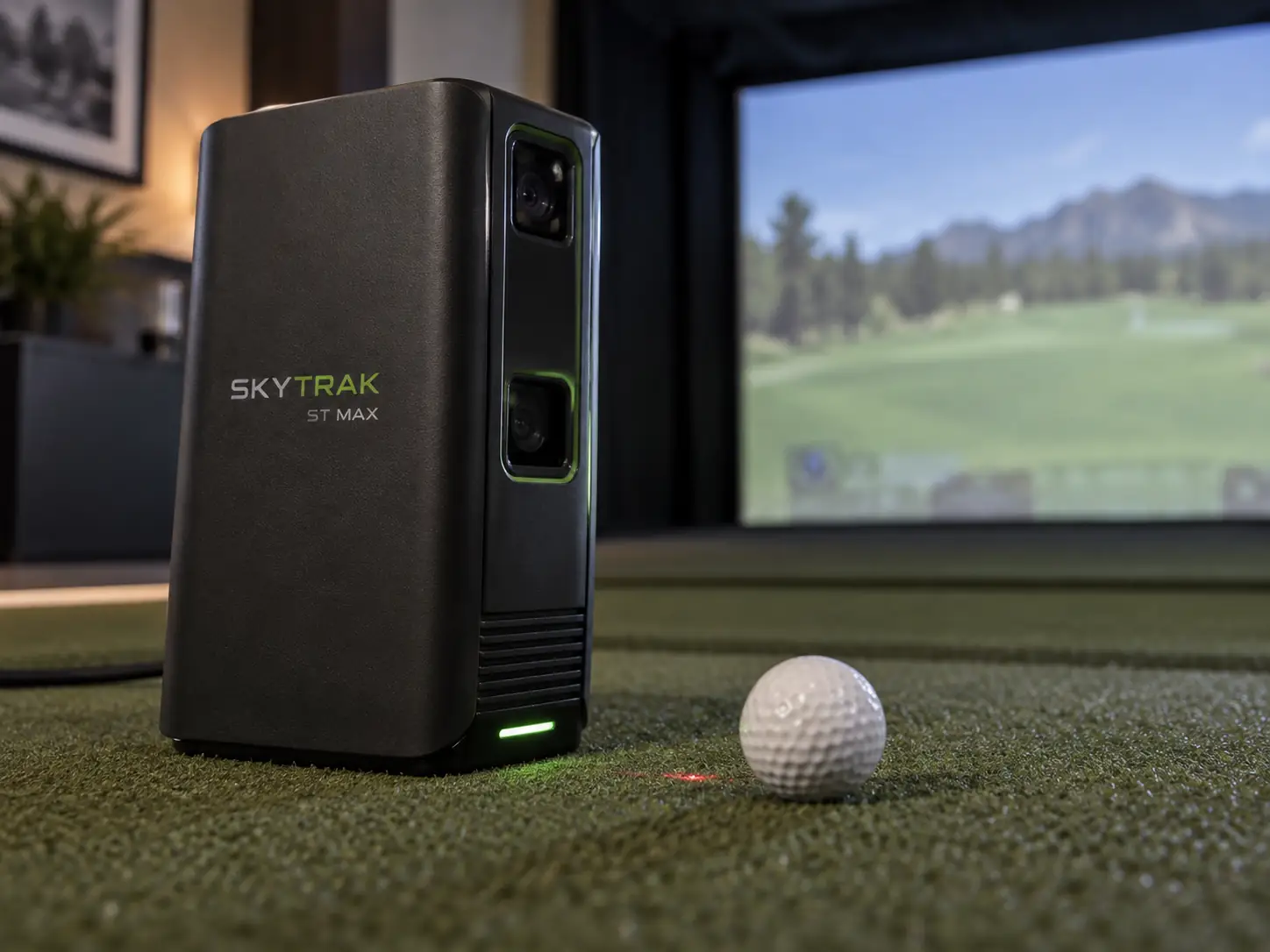
The SkyTrak ST MAX is a refined SkyTrak+ with better connectivity and built-in speed training, not a completely new measurement generation.
Its meaningful changes are two USB-C ports, revised internal packaging, a charcoal enclosure, and GOLFTEC Speed Training.
The familiar ball and club data remain the foundation.
At the current $1,695 sale price, the SkyTrak ST MAX launch monitor is much more attractive than it was at the regular $2,995 price.
I would still check the membership, simulator software, handedness, warranty, and room before letting the discount make the decision.
The Upgrade Is A Refinement Rather Than A Reset
ST MAX keeps the same basic hybrid approach used by SkyTrak+.
Photometric cameras watch the ball around impact, while dual Doppler radar helps track the club.
The unit sits beside the ball and uses a red laser to show where the ball belongs.
It sends the result to the SkyTrak app on a supported computer, tablet, or phone.
SkyTrak has not published a new ST MAX ball-measurement engine or a fresh numerical accuracy tolerance.
Current hands-on coverage also describes the normal shot experience as very close to SkyTrak+.
That is not automatically a problem.
You still get close-range capture, ordinary-ball use, no clubface stickers, Mac and mobile support, and a mature practice app.
The important question is whether the new refinements solve a problem in your setup.
A new buyer gets the current flagship.
A SkyTrak+ owner should need one of the MAX-specific improvements before upgrading.
Four Changes Define The ST MAX Update
The first change is the darker charcoal enclosure.
The second is a more modular internal design that SkyTrak says improves the product architecture.
Neither change proves better shot measurement on its own.
The third change is the practical hardware improvement.
Two USB-C ports let a Windows simulator use wired data through one port while the other supplies power.
That can make a permanent connection more reliable without draining the battery or swapping cables.
The fourth change is GOLFTEC Speed Training.
It adds no-ball speed sessions, struck-ball range work, guided drills, goals, and progress tracking.
Some reviewers have described a slightly quicker feel after impact, but SkyTrak has not published a measured latency improvement.
I would summarize the update this way:
- a new charcoal exterior
- revised internal packaging
- dual USB-C for simultaneous Windows data and power
- integrated speed training with and without a ball
That is a useful refresh, but it is not a new sensor story.
The Standard Data Set Answers Most Home-Practice Questions
ST MAX reports the ball and club information most home golfers actually use.
The ball side covers speed, vertical and horizontal launch, backspin, side spin, carry, total distance, descent angle, and shot shape.
The club side reports clubhead speed, smash factor, club path, face angle, and face-to-path.
Not every item is a separate direct sensor observation.
Smash factor compares club speed with ball speed.
Face-to-path compares two directional values.
SkyTrak’s practice guide says club path uses machine-learning models, while carry and total distance extend the observed launch through a flight model.
That does not make the numbers unhelpful.
It means the screen is reporting a mixture of observations, calculated relationships, and modeled flight.
Angle of attack is not part of the base ST MAX data set.
SkyTrak associates that field with the separate SuperTags system, along with shaft lean, shaft angle, and backswing length.
Do not buy the base monitor assuming those four values are included.
The Hitting Zone Trades Forgiveness For Room Efficiency
The active hitting area is roughly four inches by four inches.
That is small compared with many newer camera systems.
Place a clean white ball on the red laser dot and keep the unit level with the hitting mat.
The front of the monitor should sit parallel to the target line.
The official quick-start guide allows a little movement around the laser, but centering the ball creates the most repeatable setup.
You do not need a proprietary ball or reflective club sticker.
Turning a normal printed mark toward the camera can help with spin capture.
Dirty, badly scuffed, dark, or poorly lit balls make the optical job harder.
ST MAX does not need the long ball flight required by a radar behind the player.
It still needs a safe net or screen, a good hitting mat, enclosure protection, and room for a full driver swing.
SkyTrak suggests an unobstructed area around ten feet wide by ten feet deep, with ceiling height determined by the golfer and club.
Treat that as a starting point rather than a universal safe room.
Left-Handed Sharing Remains The Awkward Part
ST MAX has to move when a left-handed golfer follows a right-handed golfer.
The unit crosses to the other side of the ball.
You then change the handedness setting, match its height to the mat, and realign it with the target line.
SkyTrak’s guide also says you cannot change handedness during an active Course Play round.
That can force a mixed group to alter its game workflow as well as move the hardware.
One golfer may never see this as a problem.
A family, league, or commercial room alternating sides can run into it every few minutes.
An overhead monitor or rear-positioned radar handles mixed handedness more naturally.
ST MAX is easiest when most players swing from the same side.
Indoor And Outdoor Use Follow Different Cautions
The current ST MAX guide permits indoor and outdoor use on a suitable hitting mat.
Outside, keep direct sunlight out of the camera, place the monitor level with the ball, and keep the lens and golf ball clean.
The enclosure is not weatherproof.
Rain, moisture, extreme heat, and cold can still damage it or reduce reliable operation.
Some older product copy still mentions Micro-USB, photometric-only tracking, or indoor-only use.
Those details belong to inherited or outdated material and should not control an ST MAX purchase.
The current ST MAX overview, quick-start guide, and user guide are the better references.
Outdoor capable also does not mean ideal on every patch of range grass.
Uneven ground, changing sunlight, dirt, and the chance of a shank hitting the side-positioned unit make a stable mat and protective shield sensible.
Connection Choice Affects Reliability And Internet Access
Network Mode connects ST MAX to a 2.4 GHz home network.
That is the most useful general setup because the phone, tablet, or computer keeps normal internet access.
Direct Mode joins the host device straight to the launch monitor.
It can help away from a router, but the connected device normally loses its usual network path.
Windows users can also use wired data through USB-C.
The second USB-C port matters because it can keep the battery charged at the same time.
Before treating a missed shot as an accuracy problem, check this chain:
- Confirm the ready lights and correct handedness.
- Return the ball to the laser dot.
- Match the monitor height to the hitting surface.
- Keep the unit level and parallel to the target line.
- Clean the camera lens and turn a ball mark toward it.
- Check 2.4 GHz signal quality, VPNs, and guest-network isolation.
Those steps do not excuse persistent no-reads.
They help separate setup problems from a hardware or software fault before support is contacted.
SkyTrak Software Is Both The Advantage And The Ongoing Cost
The native SkyTrak app supports Windows, macOS, iOS, and Android.
That is a real advantage for a Mac or tablet household that wants polished practice without buying a Windows PC just to see range data.
The free level provides basic functionality.
The current Essential plan costs $99.99 per year and adds the wider practice library, evaluations, challenges, and related tools.
Core Foresight is $299.99 per year, Core Trackman is $349.99, and Elite is $599.99.
The Core and Elite plans add different course libraries and benefits.
Membership prices, course counts, and free first-year offers can change.
At the research date, a new ST MAX purchase was advertised with one year of Core Foresight after registration.
I would price the second year before judging the sale.
Add the hardware, the plan you expect to renew, the host device, projector, screen, enclosure, mat, and protection.
A golfer satisfied with basic range practice has a very different total from someone who wants both course libraries.
Third-Party Simulator Access Needs Written Confirmation
ST MAX is safest to buy around SkyTrak’s own software ecosystem.
Current public information outside that path is inconsistent.
Shop Indoor Golf says the monitor integrates only with SkyTrak simulator software.
GSPro does not list SkyTrak as an officially supported launch monitor.
Older guides still mention GSPro, E6 Connect, or TGC 2019 without always separating legacy entitlements from a new purchase.
Community connectors may work, and existing owners may keep older licenses.
Neither situation is the same as official support for a new buyer.
If one outside simulator is essential, get current written confirmation from SkyTrak and the software company.
Confirm that a new license can be purchased, ST MAX is the supported model, the connection is official, and the required bridge or membership is acceptable.
I would not build a new simulator around a forum workaround unless you are comfortable maintaining it.
Speed Training Is The Strongest Reason To Prefer MAX
Speed Training is the clearest functional reason to prefer ST MAX over SkyTrak+.
Speed Mode records swings without a ball.
Range Mode connects speed work with actual ball strikes and flight results.
The system adds guided drills, goals, baseline comparisons, and progress history.
That reduces the friction between planning a speed session, recording it, and checking whether more club speed produces useful ball speed.
The feature matters only when it becomes a routine.
Ask whether speed work already appears in the weekly schedule.
Ask whether both no-ball and struck-ball modes will be used.
Ask whether the integrated history replaces another device, app, or subscription.
Three yes answers make the MAX-specific feature meaningful.
One uncertain answer means the familiar SkyTrak practice experience is probably carrying the purchase.
Accuracy Evidence Supports Restraint Rather Than A Slogan
SkyTrak uses strong accuracy language but does not publish a complete current ST MAX comparison with per-metric tolerances.
Direct ST MAX reviews are mainly qualitative and describe consistent results with a normal brief delay after impact.
An older SkyTrak+ comparison with GCQuad found ball speed close in its sample.
It found larger differences in some driver flight and club-delivery values.
Because ST MAX appears to retain the same measurement foundation, that test is useful context.
It is not direct proof of current ST MAX performance under current firmware.
I would use repeated shot patterns, known carry distances, and strike feedback to investigate a strange result.
Club-path and face work deserve more caution than a straightforward ball-speed check because the reported values depend more heavily on the system’s methods and models.
No honest review should turn one small comparison into a guaranteed error percentage.
Battery, Dimensions, And Warranty Deserve Scrutiny
The current US user guide rates battery life at up to five hours.
Other SkyTrak material gives roughly four to four and a half hours.
I would plan for a portable session rather than a guaranteed five-hour day.
In a permanent Windows simulator, the dual-port power arrangement makes the battery much less important.
Published dimensions and weight also conflict across current and inherited pages.
That is another reason to confirm physical specifications before ordering a tight protective case or custom cabinet.
The standard new-unit warranty is six months or 25,000 shots, whichever comes first.
That is short for a launch monitor at this price.
Retailer return terms are separate, and impact damage, liquid, unauthorized repair, and other exclusions still matter.
Because ST MAX sits beside the ball, I would add a properly fitted protective shield.
It should leave the camera, laser, ports, ventilation, and hitting zone unobstructed.
ST MAX Makes Sense For A Specific Home Setup
ST MAX makes sense when the room is too shallow for rear radar, most players share one handedness, ordinary-ball convenience matters, and SkyTrak’s native practice and Course Play software is the intended destination.
The current $1,695 sale price strengthens that case.
Integrated speed training adds real value when it will be used every week.
I would look elsewhere when official GSPro support is essential, attack angle or impact video must be included, mixed-handed play is frequent, or a larger hitting zone matters.
The broader launch monitor collection includes overhead, rear-radar, and other ball-side options.
For a new SkyTrak buyer, ST MAX is a capable compact system.
For a SkyTrak+ owner, it is a focused quality-of-life upgrade.
Dual USB-C and Speed Training can be worth paying for, but neither turns familiar measurement hardware into a new accuracy generation.
What did you think?
Tap a reaction — no need to write anything.
Thanks for letting us know!
Interested in this?
Leave your details and tell us which applies.

Comments are closed.