
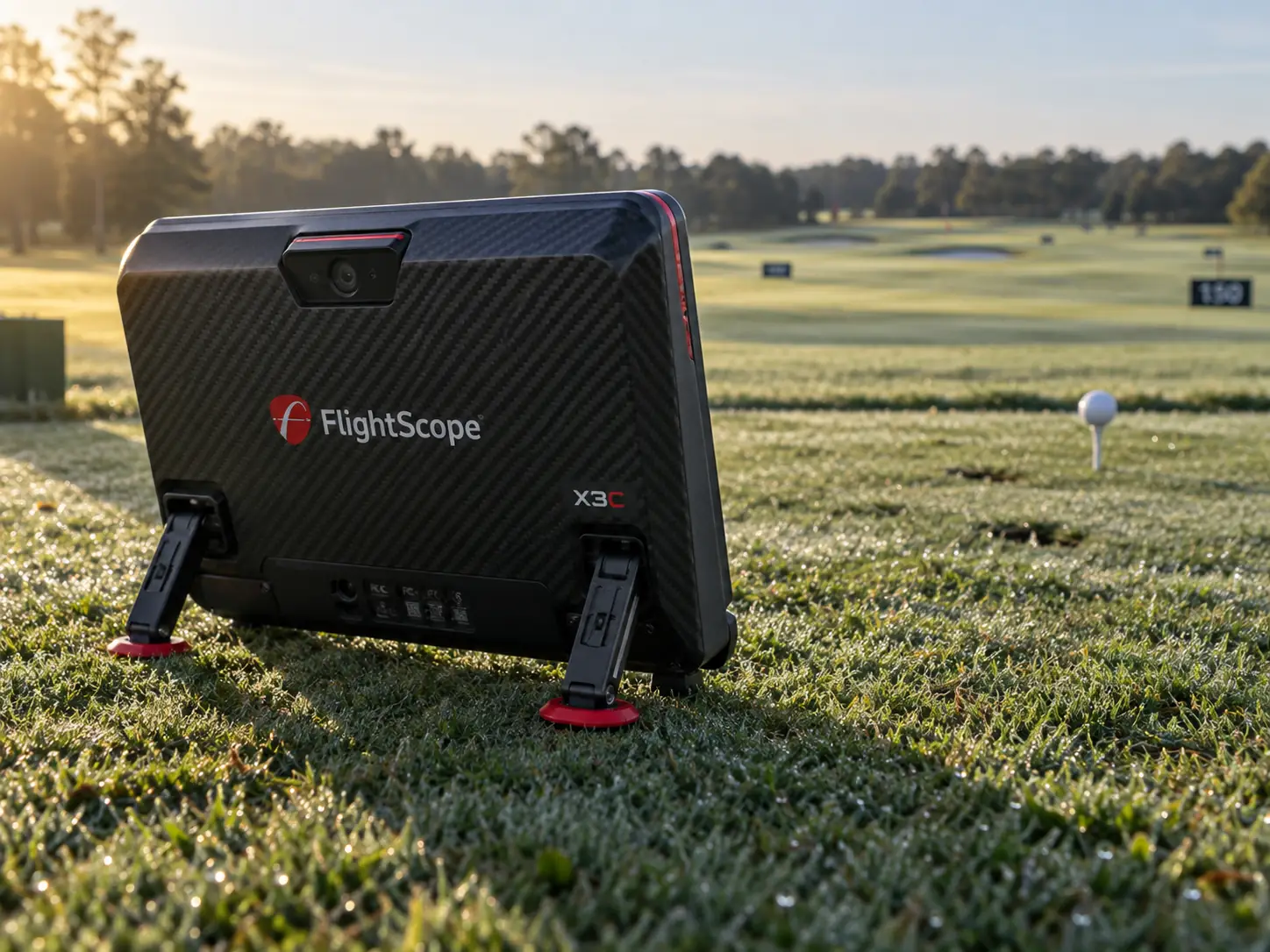
The FlightScope X3C makes the most sense for a coach, fitter, academy, or facility that will use its full-flight radar, detailed club data, impact location, short-game measurements, and lesson video every week.
It is usually too much launch monitor for a home golfer who mainly wants range numbers or simulator golf.
The room can eliminate it before the budget does because X3C still needs a long radar path indoors.
Current pricing also needs checking.
FlightScope lists a $12,745 promotional price, while the FlightScope X3C launch monitor page currently lists $14,995.
At either number, the professional workflow has to justify the purchase.
X3C Is A Mobile Professional Workstation
X3C combines three-dimensional Doppler radar with synchronized high-speed image processing.
FlightScope calls that system Fusion Tracking.
The radar sits behind the ball and can move between a studio, grass range, fitting bay, and simulator.
Automatic leveling feet and an internal setup camera make those changes easier.
The carbon-fiber shell distinguishes X3C from the older X3 hardware still mentioned on some retailer pages.
It weighs roughly six pounds ten ounces according to current FlightScope material.
That is transportable, but it is more substantial than a small consumer radar.
There is no user-facing display on the unit.
A compatible phone, tablet, or Windows computer provides the interface through FS Golf.
Simulator use may also add a gaming PC, projector, and software license.
Portability therefore means moving a professional system, not carrying one self-contained box.
Full-Flight Tracking Creates The Clearest Reason To Upgrade
Full-flight outdoor tracking is the clearest reason to choose X3C over a lower-cost FlightScope.
With unrestricted ball flight, X3C follows the shot from impact to landing.
A limited-flight radar only sees the early part of the flight before the ball reaches a screen or net.
That difference matters when a fitter or coach wants to study the actual downrange result in the day’s conditions.
It matters much less in a permanent indoor simulator.
Following the ball outdoors can also create a brief wait before the final result appears.
That is a reasonable trade for complete flight data during a professional session.
It is not the feature that earns the premium when every shot travels eight feet into a screen.
If the monitor will rarely leave the room, I would compare a fixed overhead camera system before spending five figures on outdoor capability.
Fifty Parameters Describe Several Measurement Toolkits
FlightScope advertises fifty data parameters, but you will not use all fifty on every ordinary swing.
The number spans full swings, chips, putts, impact location, club profiles, and session views.
The full-swing set covers speed, launch, spin, carry, roll, total distance, height, flight time, landing, curve, and dispersion.
It also includes advanced club fields such as path, face relationships, angle of attack, dynamic loft, spin loft, low point, swing planes, and speed profiles.
Face Impact Location adds horizontal and vertical strike position plus a session heat map.
Unlike Mevo Gen2 and Mevo+, that feature is included rather than sold as a separate upgrade.
A coach can connect strike, delivery, ball flight, and video without guessing impact from smash factor alone.
I would still hide most of the data during an ordinary lesson.
A fitting may need launch, spin, descent, carry, strike, and dispersion.
A contact lesson may need low point, impact location, path, and face relationship.
The monitor is valuable when its depth answers a defined question, not when fifty labels fill the screen.
Short Game And Putting Separate X3C From Basic Radars
X3C goes much deeper than a normal consumer radar around the green. Its chipping mode keeps a broad group of flight and delivery values.
The current setup guidance uses a closer sensor position for short shots and supports limited flight indoors.
Outdoors, FlightScope describes tracking chip shots up to fifty yards.
Putting includes more than launch speed, direction, and total distance.
X3C can report skid and roll distance, deceleration, bounce count, bounce distance, and a ball-speed profile.
That can help a putting coach discuss how the ball starts and settles into roll.
It has much less value for a home golfer who concedes short putts in simulator rounds.
The same rule applies to chipping.
Buy the extra depth only when short-game work already has a place in the weekly program.
Indoor Use Needs More Than The Minimum Distances
Current FlightScope guidance calls for roughly eight to ten feet from X3C to the tee and at least eight feet of ball flight indoors.
Those are measurement distances, not complete room dimensions.
The screen needs space behind it, the enclosure needs depth, the golfer needs a safe driver swing, and the projector needs a workable throw position.
You also need walking room and a protected place for the radar behind the player.
I would tape the room in this order:
- Mark the impact screen and its distance from the wall.
- Place the hitting position with enough room for the golfer and enclosure.
- Measure the required ball flight toward the screen.
- Mark the X3C position directly behind the ball.
- Check doors, seating, outlets, cables, and foot traffic behind the golfer.
- Test the separate position and flat roll area needed for putting.
A shallow room may be better served by a camera beside the ball or a ceiling-mounted system.
The professional label does not make radar geometry optional.
Limited Flight Adds Dots, Lighting, And Interference Control
Indoor spin requires more setup than simply placing a ball on the mat.
FlightScope instructs users to apply one aluminum sticker to a standard ball or use a compatible Titleist RCT ball.
The sticker faces the target at address.
The radar also needs a clear path to the ball.
Fluorescent lights, moving fans, large metal objects, refrigerators, HVAC equipment, and machinery can interfere with tracking.
Moving the mat or aiming the sensor slightly away from the target line creates another source of bad information.
Face Impact Location has its own lighting requirement.
FlightScope calls for at least 300 lux in a three-foot area around the ball.
A dark simulator can still look good on the screen while being too dim for the camera-assisted impact feature.
I would treat the bay like a measurement space and make the setup repeatable.
That is faster than troubleshooting a different room problem every session.
FS Golf Turns Measurement Into A Lesson Workflow
FS Golf is where X3C becomes a teaching tool rather than a box of numbers. The app organizes data, trajectories, averages, targets, and session history.
It can also create clipped swing video with data overlays, drawings, recorded comments, and sharing.
That lets a coach send the player the result and explanation together.
MultiCam can add supported phone or tablet angles to the built-in view.
FS Skills provides combines and custom targets for benchmarking and distance-control work.
Environmental Optimizer can model changes in altitude, temperature, humidity, wind, and landing height.
That is useful for scenario planning, but it does not measure the weather at a future tournament.
Some FlightScope tools remain platform-specific.
Check the exact iOS, Android, and Windows workflow before building a lesson process around one feature.
Simulation Is Included But Not Cost-Free Forever
The current X3C package includes a twelve-course E6 Connect license for iOS and PC.
FlightScope also lists integrations with GSPro, Awesome Golf, Creative Golf, and TGC 2019.
There is no required annual FlightScope subscription for the core X3C data and native apps.
That does not make the complete simulator free after the hardware purchase.
Third-party software, extra courses, online services, and a gaming PC can add one-time or annual costs. An outside program may also display only part of the X3C data set.
Choose the simulator software first, then confirm its current X3C support, visible fields, host requirements, and license terms.
FlightScope does not provide an unrestricted consumer interface for any custom program.
Access is limited to approved integration partners.
Ownership Details Reveal A Few Compromises
The battery specification is not completely consistent across FlightScope’s own material. Product highlights say more than seven hours, while the comparison page lists up to six.
I would plan around six and treat longer runtime as a favorable result because connection, video use, temperature, and age all affect it.
The unit supports Wi-Fi, USB, and Ethernet.
Ethernet is useful in a fixed teaching studio, while Wi-Fi helps when the radar moves outdoors.
The included case, power supply, cables, aluminum stickers, tape measure, and E6 license create a practical starting kit.
The direct and retailer prices currently differ by $2,250.
Retailer copy can also mix older X3 names, weights, and software bundles with the current X3C.
Confirm the exact hardware, included E6 entitlement, warranty, return policy, and checkout price with the seller before ordering.
Accuracy Claims Still Require Disciplined Interpretation
Fusion Tracking and full-flight observation make X3C a serious measurement platform.
They do not create one public accuracy tolerance that applies to every metric, club, room, and competing monitor.
One independent hands-on review found broadly similar ordinary full-swing results between X3C and Mevo+.
The same reviewer found that X3C registered chips more consistently and produced much deeper putting information.
That helps explain the premium.
It is not a controlled laboratory study, so the result should not be treated as universal.
Professionals should use a repeatable setup, watch for implausible outliers, and investigate the environment before changing a player’s technique around one number.
Patterns across several well-struck shots matter more than a single impressive decimal.
Use A Professional-Value Test Before Buying
X3C earns its place when several of these statements are true:
- full outdoor flight to landing is used regularly
- coaching, fitting, or player development creates real business or program value
- detailed chipping and putting analysis has a defined purpose
- impact location, club delivery, video, and ball flight need to share one workflow
- the monitor must travel between indoor and outdoor locations
- the room provides the complete rear and forward radar path
If only one condition applies, a less expensive monitor may answer the important questions.
Mevo Gen2 covers a broad FlightScope practice and simulator role for much less money.
A compact camera unit suits many shallow rooms.
An overhead monitor can improve a permanent mixed-handed studio.
The FlightScope launch monitor collection makes those lower-cost layouts easier to compare.
X3C Is Excellent When Its Uncommon Strengths Are Routine
X3C is excellent when its uncommon strengths are part of the normal week.
Full outdoor tracking, advanced delivery data, impact location, short-game analysis, and synchronized video can support a serious professional service.
I would skip it when simulator golf and basic full-swing numbers are the main goals.
I would also skip it in a shallow room or a program that will open the advanced fields once and forget them.
This is not simply a more expensive home launch monitor.
It is a professional workstation, and its value depends on using the jobs that make it expensive.
What did you think?
Tap a reaction — no need to write anything.
Thanks for letting us know!
Interested in this?
Leave your details and tell us which applies.

Comments are closed.